Verifying a Verifiable Presentation
Overview
Presentations are verified with the same entry point as everything else —
verifyDocument. It detects that the document is a presentation and runs
the presentation verifiers, returning the same three fragment types you already handle.
There is no separate vp-verify command, and you do not need to unwrap the presentation yourself.
- Using the library
- Using CLI
- Using the web verifier
import { verifyDocument, isValid } from '@trustvc/trustvc';

const fragments = await verifyDocument(signedPresentation);

console.log(isValid(fragments)); // true only if every check passed

for (const fragment of fragments) {
  console.log(`${fragment.type}: ${fragment.status}`);
  if (fragment.status !== 'VALID') console.log('  ', fragment.reason?.message);
}
trustvc verify
? Please enter the path to your document: ./signed_vp.json

ℹ  info      Verifying W3C Verifiable Presentation...
✔  success   DOCUMENT_INTEGRITY: VALID
✔  success   DOCUMENT_STATUS: VALID
✔  success   ISSUER_IDENTITY: VALID
ℹ  info      2 embedded credentials verified.
The final line appears only when the presentation is valid. The three status lines read identically whether one credential was checked or five, so the count states what they cannot.
Drop the presentation onto the verifier at trustvc.io — no installation, and useful for confirming what a counterparty will see when you send them a presentation.
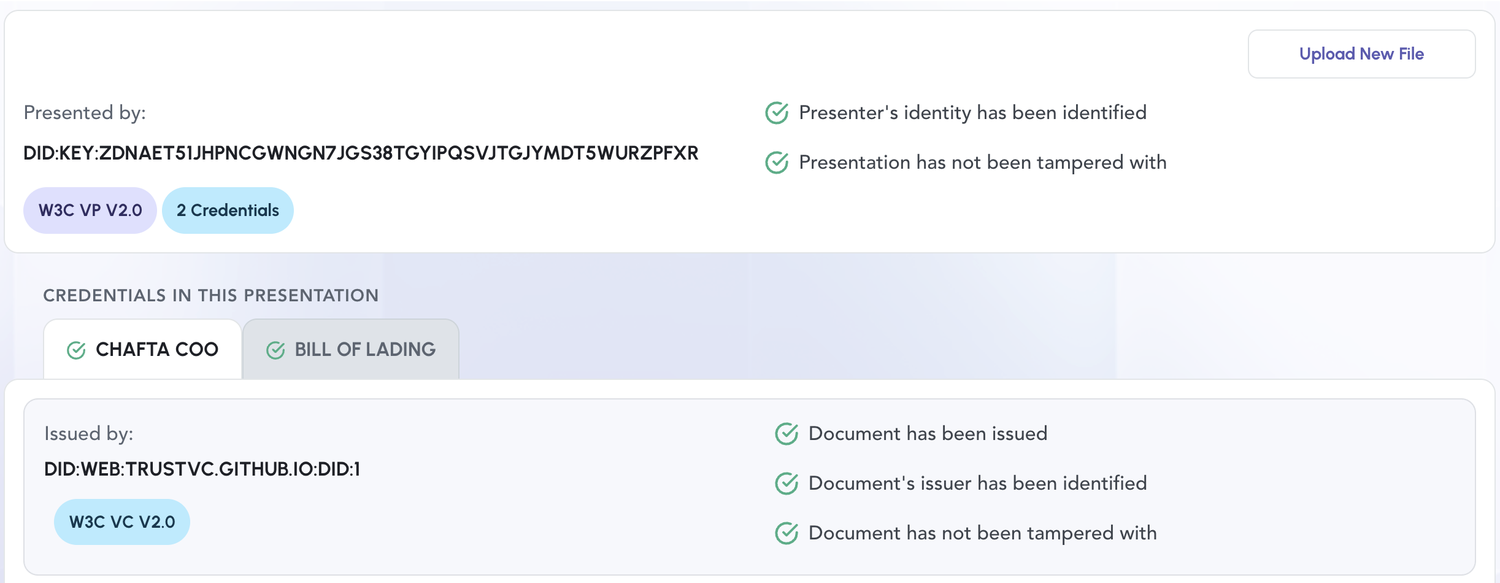
A presentation is displayed in two levels, which is the main difference from a single credential:
- The card at the top describes the envelope — Presented by is the holder DID, and the
W3C VP V2.0and2 Credentialstags say what was uploaded. - Under Credentials in this presentation, each embedded credential has its own tab, labelled by its template or type, carrying its own Issued by and its own checks.
So a per-credential problem surfaces against the credential it belongs to, not against the presentation: an expired or revoked credential shows a cross on its tab while the envelope's checks stay green.
When verification fails, the page switches to an error state carrying the reason, so read the message rather than the rows.
What each fragment covers
The three fragment types are the same as for a credential, but each one covers more ground, because a presentation contains credentials and a holder's claim to them.
DOCUMENT_INTEGRITY
Everything signature-related, at both levels:
- The holder's proof over the presentation verifies.
- Holder binding holds — the signer's DID matches the declared
holder. - Each embedded credential's own issuer signature verifies.
VALID here means: nothing has been altered since signing, and the party presenting is the party
named as holder.
const integrity = fragments.find((f) => f.type === 'DOCUMENT_INTEGRITY');
// fragment.name === 'W3CVpSignatureIntegrity'
// fragment.data.credentialResults — one entry per embedded credential
DOCUMENT_STATUS
Everything time- and revocation-related, again at both levels:
- The presentation's own validity window (
validUntil). - Each embedded credential's window — expired, or not yet valid.
- Each embedded credential's revocation status, resolved from its status list.
VALID here means: the presentation is still within its window, and every credential inside is
still in force.
ISSUER_IDENTITY
Every embedded credential's issuer resolves and is trusted — the issuer DID document can be fetched and lists the signing key. Also fails if the presentation carries no credentials at all, since there is then no issuer to identify.
ISSUER_IDENTITY concerns the credentials' issuers, never the presentation's holder. The
holder is checked by DOCUMENT_INTEGRITY, because holder binding is part of what the proof
asserts.
Reading a failure
Fragment statuses are the same four values as for credentials: VALID, INVALID, SKIPPED,
ERROR. See Fragment Statuses.
What matters for a presentation is which of the two levels failed, because the remedy differs. The fragment type alone will not tell you — a presentation and a credential inside it can fail the same fragment. The message distinguishes them, and it follows a consistent shape:
| The message names… | The fault is in… | Who can fix it |
|---|---|---|
| the presentation — "Presentation has expired…", "Presentation is not signed…" | the envelope the holder signed | The holder — sign a new presentation. The credentials inside may be perfectly valid. |
| an embedded credential, always with its index — "Embedded credential at index 0 has…" | that one credential, identified by position | The issuer of that credential — it must be reissued or its status changed. Re-presenting cannot help. |
| neither, e.g. "Invalid signature." | the signed payload as a whole | The holder — re-sign from the original credentials. Never edit a signed presentation. |
So read the message first, and look for an index. Embedded credential at index 1 … means the
second credential in the array — the numbering is zero-based, and it is how you find which one to
chase.
That shape holds for messages this page does not list. New checks are added to the verifier over time, and the same rule applies to them: a message naming the presentation is the holder's to fix, a message naming an embedded credential belongs to that credential's issuer.
Two cases are worth reading closely, because in both the fragment that fails is not the one you might expect.
The two expiries are different failures
Presentation has expired and Embedded credential … has expired land on the same fragment and
read almost identically, but they need opposite remedies:
- An expired presentation is the holder's to fix — they sign a fresh one, and the credentials inside are untouched.
- An expired credential is the issuer's to fix — the holder can re-present forever and it will keep failing.
In the second case the presentation itself is intact:
ℹ  info      Verifying W3C Verifiable Presentation...
✔  success   DOCUMENT_INTEGRITY: VALID
⚠  warning   DOCUMENT_STATUS: INVALID - Embedded credential at index 0 has expired (validUntil 2026-01-01T09:25:04.812Z).
✔  success   ISSUER_IDENTITY: VALID
DOCUMENT_INTEGRITY stays VALID, and that is correct: the signature is sound, the holder is who
they claim to be, nothing was altered. A claim inside is simply no longer current. The same holds
for a revoked credential — the holder's proof is unaffected by a credential going bad afterwards.
An unresolvable issuer also fails integrity
When an embedded credential's issuer cannot be resolved, expect two failures:
ISSUER_IDENTITY: INVALID and DOCUMENT_INTEGRITY: INVALID. That is not a second, separate
problem — verifying a credential's signature requires the issuer's public key, which is exactly
what could not be fetched.
So the integrity failure here is a consequence of the resolution failure, not separate evidence that the document was altered.
Verifying credentials individually
The presentation's fragments are the source of truth for the overall verdict — only they check the holder's proof and holder binding. If you also want a per-credential verdict, for example to show one row per credential in a UI, extract the credentials and verify each on its own:
const credentials = [signedPresentation.verifiableCredential].flat();

const perCredential = await Promise.all(
  credentials.map((credential) => verifyDocument(credential)),
);
Be aware of what this cannot see: a credential verified in isolation has no holder proof and no holder binding, so a set of individually-valid credentials says nothing about who is presenting them. Use it for display, not for the decision.
Try it
The CLI ships one presentation per outcome — valid, expired at each level, revoked, tampered, unsigned, holder-mismatched, unresolvable issuer — so each failure above can be reproduced against a real document:
git clone https://github.com/TrustVC/trustvc-cli
cd trustvc-cli && npm install
node tests/fixtures/vp/generate.cjs

trustvc verify   # → tests/fixtures/vp/presentations/invalid/credential_expired.json
Anything under presentations/invalid/ must fail, and the filename says how. That folder's
README.md records the exact message each one produces.