Overview
graph TD;
subgraph Z[" "]
direction LR
    A(Overview)-- CLI -->B(Deploying Document Store - CLI);
    A(Overview)-- Code -->C(Deploying Document Store - Code);
    B-->D(Configuring DNS);
    C-->D(Configuring DNS);
    D-->E(Creating Raw Document)
    E -- CLI -->F(Wrapping Documents - CLI);
    E -- Code -->G(Wrapping Documents - Code);
    F-->H(Issuing Documents - CLI);
    G-->I(Issuing Documents - Code);
    H-->J(Revoking Documents - CLI);
    I-->K(Revoking Documents - Code);

    click A href "/docs/how-tos/open-attestation/verifiable-documents/dns-txt/overview"
    click B href "/docs/how-tos/open-attestation/verifiable-documents/dns-txt/deploying-document-store/document-store-cli"
    click C href "/docs/how-tos/open-attestation/verifiable-documents/dns-txt/deploying-document-store/document-store-code"
    click D href "/docs/how-tos/open-attestation/verifiable-documents/dns-txt/configuring-dns"
    click E href "/docs/how-tos/open-attestation/verifiable-documents/dns-txt/raw-document"
    click F href "/docs/how-tos/open-attestation/verifiable-documents/dns-txt/wrapping-document/wrapping-document-cli"
    click G href "/docs/how-tos/open-attestation/verifiable-documents/dns-txt/wrapping-document/wrapping-document-code"
    click H href "/docs/how-tos/open-attestation/verifiable-documents/dns-txt/issuing-document/issuing-document-cli"
    click I href "/docs/how-tos/open-attestation/verifiable-documents/dns-txt/issuing-document/issuing-document-code"
    click J href "/docs/how-tos/open-attestation/verifiable-documents/dns-txt/revoking-document/revoking-document-cli"
    click K href "/docs/how-tos/open-attestation/verifiable-documents/dns-txt/revoking-document/revoking-document-code"
end
Building upon OpenAttestation framework, our Verifiable Document form one of two core pillars for TrustVC framework.
In this tutorial guide, you will be deploying a verifiable document.
Goal
By the end of this guide, you would be able to create your 📜 Certificate of Completion that is valid on any compatible TrustVC Verifier. The following guides are available:
- Issue a TrustVC Verifiable document that interacts with Ethereum Smart Contract.
Before we begin, lets take some time to understand the overall architecture of our verifiable documents.
Overview of Verifiable Documents (through a document store)
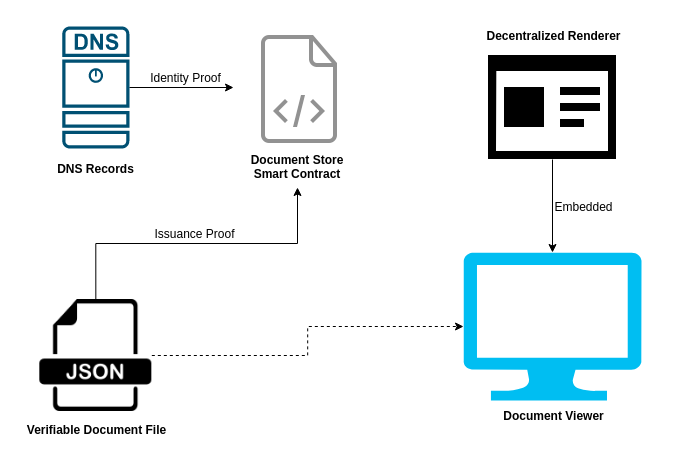
Document Store Smart Contract
The document store is a smart contract deployed onto the blockchain. When a TrustVC document is issued, a proof of the issuance is stored onto the blockchain through the smart contract.
The smart contract is used to provide a globally consistent record for anyone to query a given TrustVC document's issuance status.
DNS Records
A domain is required to issue a TrustVC document. A DNS record must be inserted to the DNS to assert the identity of the TrustVC document issuer.
Verifiable Document File
A Verifiable Document File is also known as the TrustVC document. Machine-readable data of the TrustVC document is stored in a .json file. In addition to the data, these .json files also contain information such as:
- claim of issuer's identity
- document rendering information
- document store smart contract
Decentralized Renderer
The decentralized renderer gives the TrustVC document a human-readable look. It is essentially a website which will take a TrustVC document data as input and display the document in a web view. This allows anyone to style their document without submitting code change to another party.
This tutorial will now require you to choose between the following options:
graph TD;
subgraph Z[" "]
direction LR
    A(Overview)-- CLI -->B(Deploying Document Store - CLI);
    A(Overview)-- Code -->C(Deploying Document Store - Code);
    B-->D(Configuring DNS);
    C-->D(Configuring DNS);
    D-->E(Creating Raw Document)
    E -- CLI -->F(Wrapping Documents - CLI);
    E -- Code -->G(Wrapping Documents - Code);
    F-->H(Issuing Documents - CLI);
    G-->I(Issuing Documents - Code);
    H-->J(Revoking Documents - CLI);
    I-->K(Revoking Documents - Code);

    click A href "/docs/how-tos/open-attestation/verifiable-documents/dns-txt/overview"
    click B href "/docs/how-tos/open-attestation/verifiable-documents/dns-txt/deploying-document-store/document-store-cli"
    click C href "/docs/how-tos/open-attestation/verifiable-documents/dns-txt/deploying-document-store/document-store-code"
    click D href "/docs/how-tos/open-attestation/verifiable-documents/dns-txt/configuring-dns"
    click E href "/docs/how-tos/open-attestation/verifiable-documents/dns-txt/raw-document"
    click F href "/docs/how-tos/open-attestation/verifiable-documents/dns-txt/wrapping-document/wrapping-document-cli"
    click G href "/docs/how-tos/open-attestation/verifiable-documents/dns-txt/wrapping-document/wrapping-document-code"
    click H href "/docs/how-tos/open-attestation/verifiable-documents/dns-txt/issuing-document/issuing-document-cli"
    click I href "/docs/how-tos/open-attestation/verifiable-documents/dns-txt/issuing-document/issuing-document-code"
    click J href "/docs/how-tos/open-attestation/verifiable-documents/dns-txt/revoking-document/revoking-document-cli"
    click K href "/docs/how-tos/open-attestation/verifiable-documents/dns-txt/revoking-document/revoking-document-code"
end