Perform Transactions
Background
Legal asset ownership is typically conferred upon an entity by a document termed as a Title, or Title Deed. The party who holds this ownership is known as the Owner.
In the physical world, an original print of the physical Title can be held by various parties at points in its' life cycle. This is termed Possession, or Holdership. There are no restrictions on who can have possession of a title, subject to the physical constraints of an existing holder passing holdership to the next holder.
A Title that can have its' Owner changed after issuance, is known as a Negotiable Title. Conversely, a Title that has a fixed Owner for the rest of its' lifetime is known as a Non-negotiable Title.
In the case where a Negotiable Title has its' Owner changed, this procedure is termed Endorsement. This change of ownership is only allowed by its' current Owner.
TrustVC Contribution
As previously documented under the Token Registry section, we can represent control of a TrustVC document uniquely and singularly by registering its' hash with the Issuer's token registry. This hash is also known as a Token ID. This control will also be referred to as the Token.
However, as the ERC721 standard only specifies a single mode of ownership, it cannot represent the duality of physical possession and legal ownership.
In order to properly represent this, we introduce the Title Escrow smart contract. This smart contract will hold the Token and subject it to logical rules that we have derived from the existing physical workflow. Since the smart contract holds the Token in escrow, the smart contract, and only the smart contract can allow any changes in the Token status.
Title Escrow
The Title Escrow is an immutable contract except for its fields. It has two notable fields:
-
The Owner
-
The Holder
Owner
Every instance of the Title Escrow consists of the Owner field that changes when a transfer takes place.
There are two scenarios in which this can occur.
Firstly, if Owner and Holder are the same party - he can directly effect a transfer of the Token. This is termed Immediate Endorsement.
Secondly, if Owner and Holder are different parties - this is a novel scenario not possible in the current physical model, as physical Endorsement requires the Title be physically signed upon by the Owner and thus making him also the holder.
In this scenario, we allow the Owner to prepare a Remote Endorsement, but for it to take effect the holder has to subsequently execute it.
Holder
The Holder field is much simpler, and similarly to the physical world - an existing holder (and only the holder) can effect a change in Possession without further approval.
Return to Issuer
At the end of its' life cycle, a Title is returned back to the Issuer. This is effected by transferring the Token back to the Issuer.
The Title Escrow makes an allowance for this action to be performed by the Owner, only when he is also the holder. This action is termed returnToIssuer.
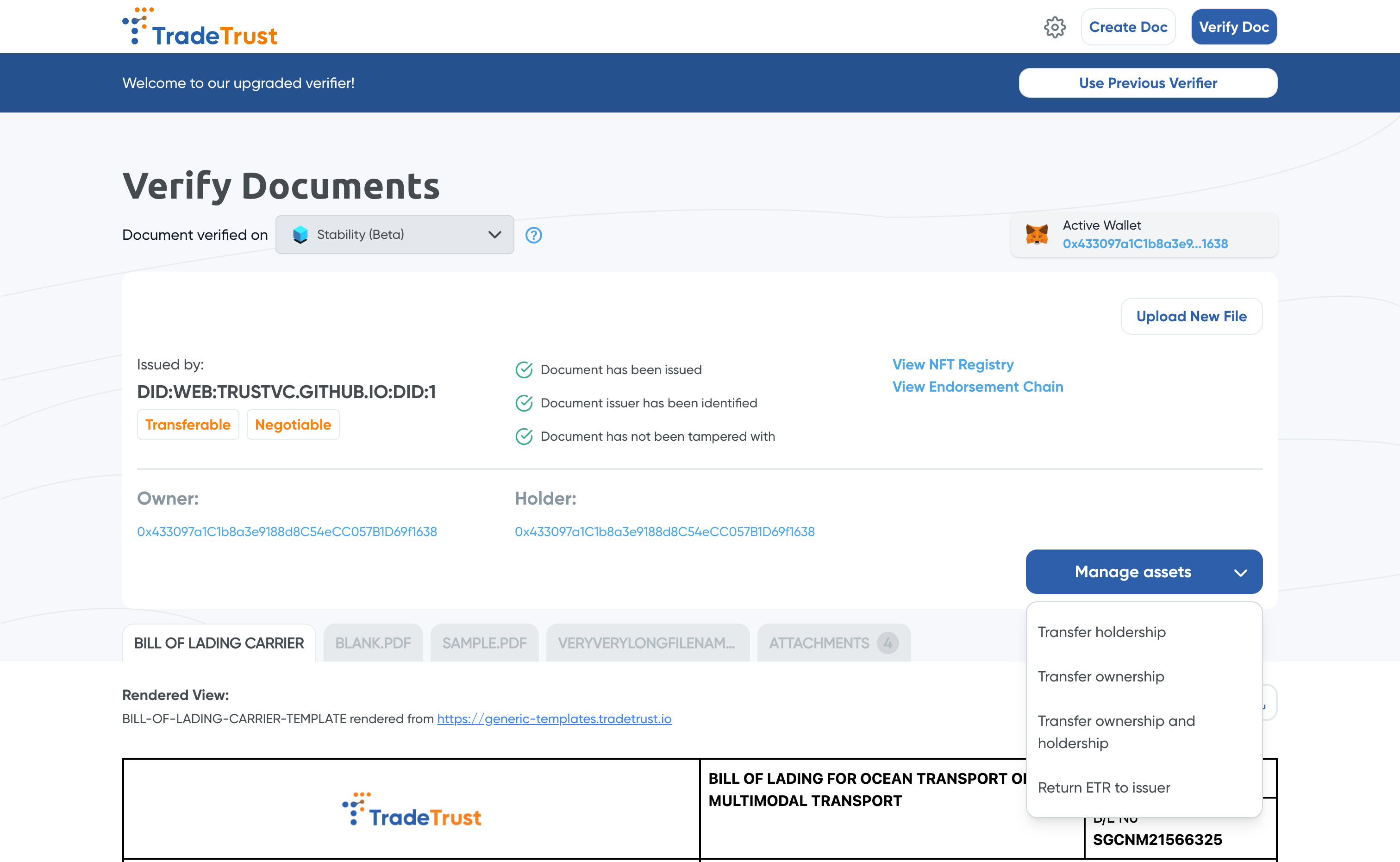
Manage Assets
User interface of how EBL is transferred/endorsed/returned using Manage Assets. (Note that this only appears for Transferable Record type of documents)
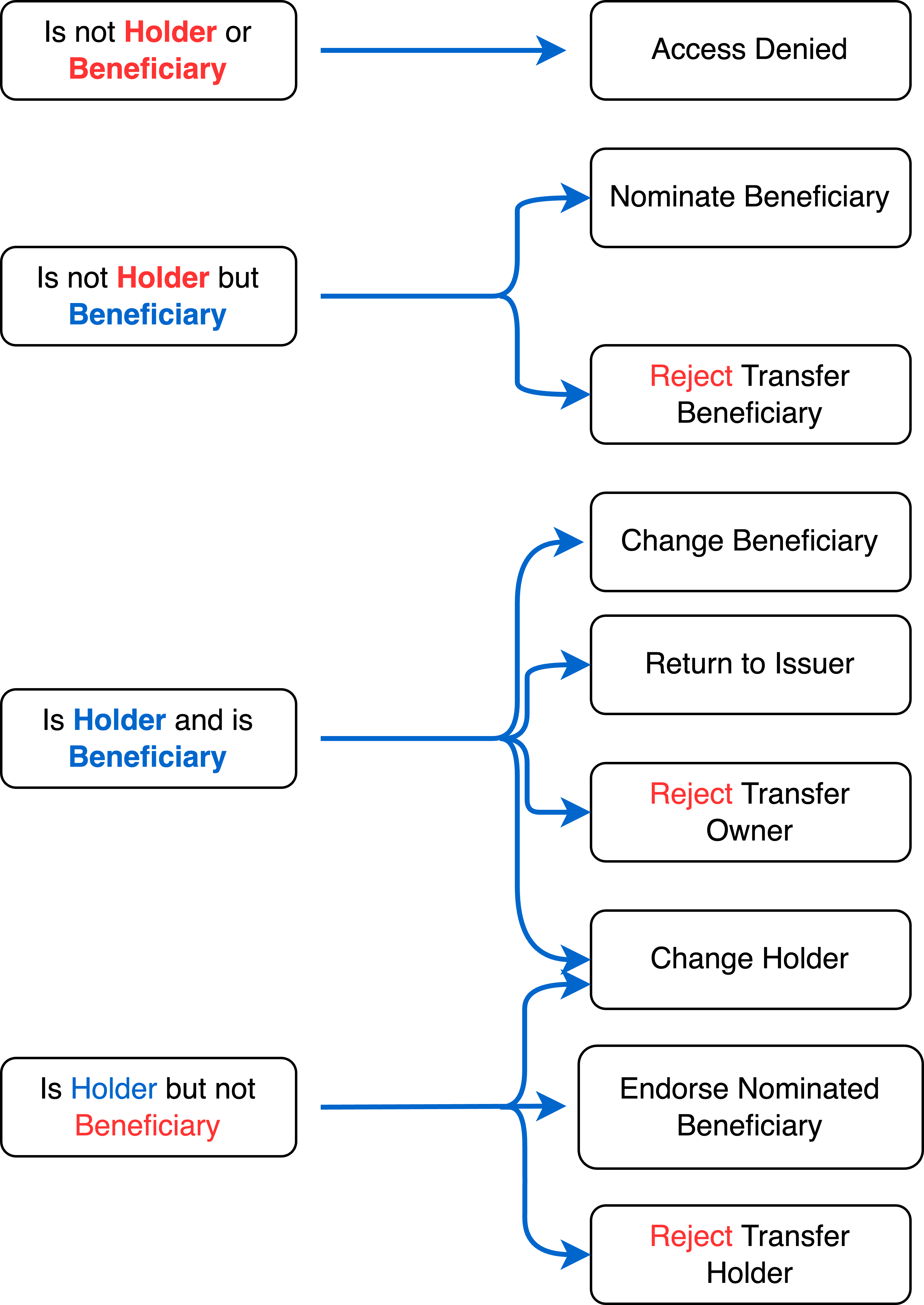
Summary Table of Actions
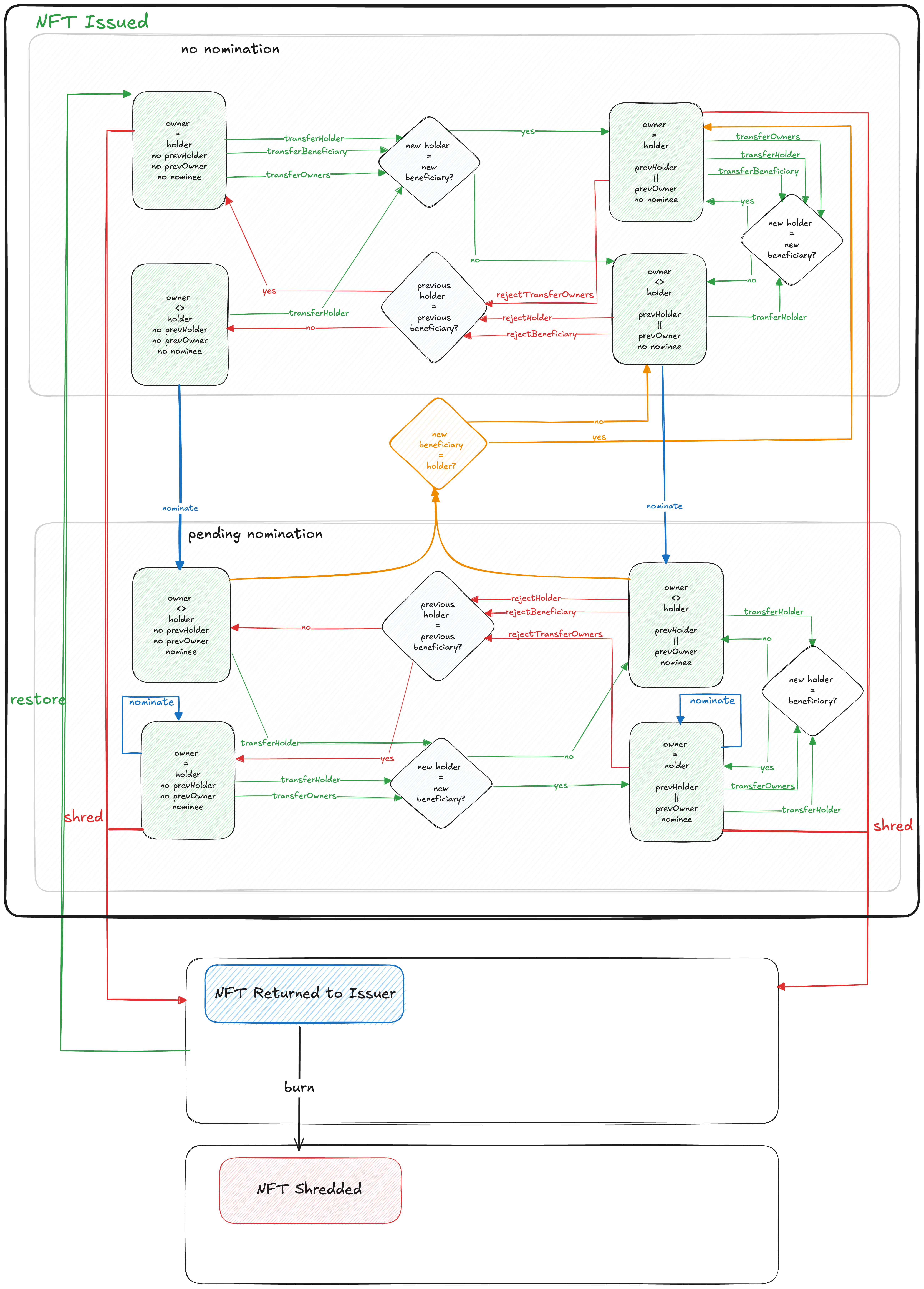
This document includes a Stateflow diagram illustrating the available actions that can be performed on a token ID by the holder and owner on the blockchain. The Title Escrow contract manages and represents token ownership between a beneficiary and a holder. During minting, the Token Registry creates and assigns a Title Escrow as the owner of the token. Actual owners interact with the Title Escrow contract to execute ownership-related operations.
Below is the Stateflow diagram depicting all the functions of the Title Escrow smart contract.
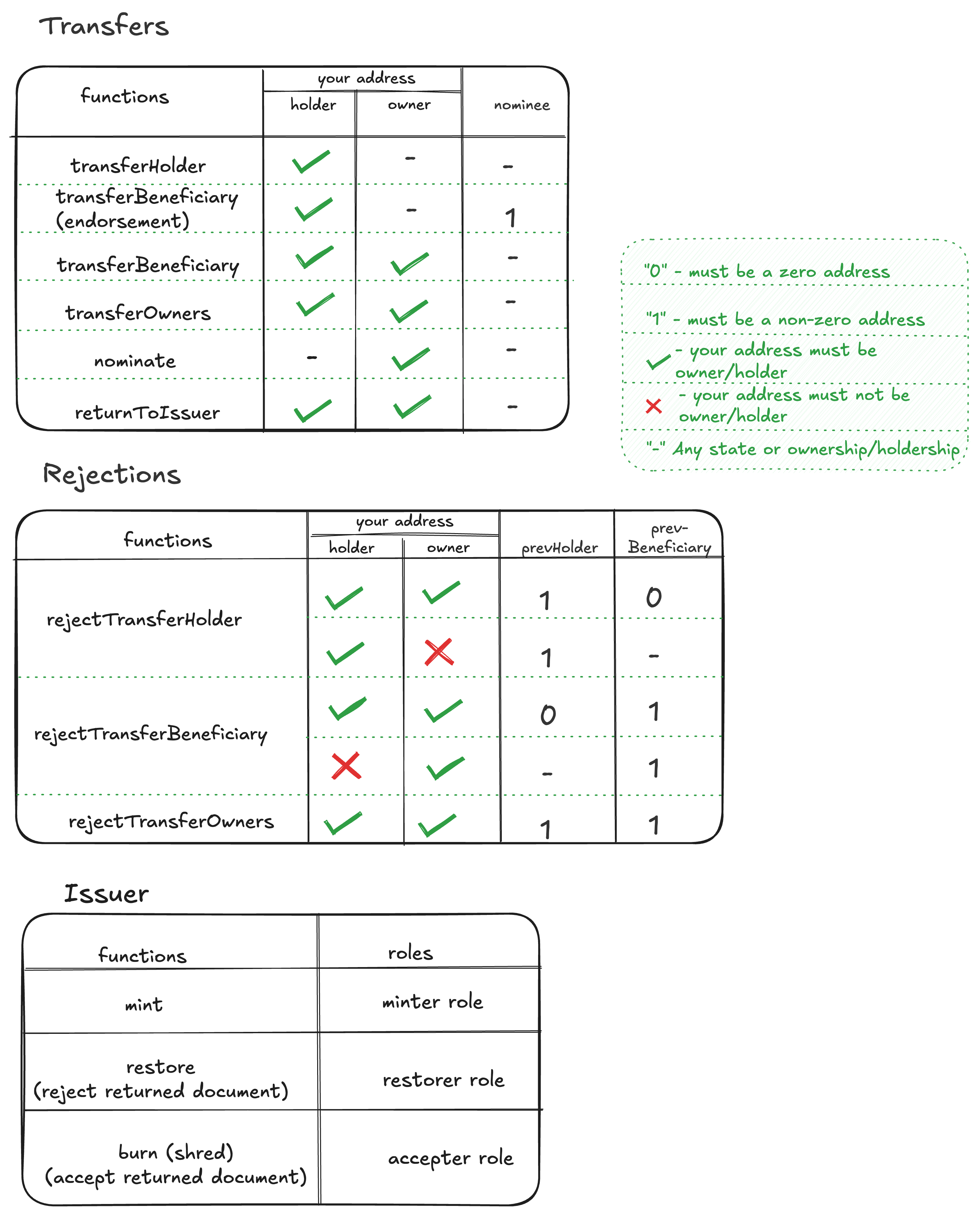
Below are the available transactions based on your role (Owner/Holder) and the current state of the token, whether as a Nominee, Previous Holder, or Beneficiary. You can successfully execute transactions depending on the provided state and role conditions.
Executing Transactions on Title Escrow
To execute these transactions, you can use either the Command Line Interface (CLI) or interact with the smart contract programmatically through code. Below, we provide step-by-step instructions on both methods, starting with the installation process.
1) Using Code
Installation
npm install --save @trustvc/trustvc
Usage
To use the package, you will need to provide your own Web3 provider or signer (if you are writing to the blockchain). This package exposes the Typechain (Ethers) bindings for the contracts.
TradeTrustToken
The TradeTrustToken is a Soulbound Token (SBT) tied to the Title Escrow. The SBT implementation is loosely based on OpenZeppelin's implementation of the ERC721 standard.
An SBT is used in this case because the token, while can be transferred to the registry, is largely restricted to its designated Title Escrow contracts.
See issue #108 for more details.
Connect to existing token registry
import { v5Contracts } from "@trustvc/trustvc";

const connectedRegistry = v5Contracts.TradeTrustToken__factory.connect(tokenRegistryAddress, signer);
Issuing a Document
await connectedRegistry.mint(beneficiaryAddress, holderAddress, tokenId, remarks);
Restoring a Document
await connectedRegistry.restore(tokenId, remarks);
// Guard - document should be already returned to issuer
Accept/Burn a Document
await connectedRegistry.burn(tokenId, remarks);
// Guard - document should be already returned to issuer
Title Escrow
The Title Escrow contract is used to manage and represent the ownership of a token between a beneficiary and holder.
During minting, the Token Registry will create and assign a Title Escrow as the owner of that token.
The actual owners will use the Title Escrow contract to perform their ownership operations.
A new remark field has been introduced for all contract operations.
The remark field is optional and can be left empty by providing an empty string "0x".
Please note that any value in the remark field is limited to 120 characters, and encryption is recommended.
Please refer to the sample encryption implementation .
Connect to Title Escrow
import { v5Contracts } from "@trustvc/trustvc";

const connectedEscrow = v5Contracts.TitleEscrow__factory.connect(existingTitleEscrowAddress, signer);
Transfer of Beneficiary/Holder
Transferring of beneficiary and holder within the Title Escrow relies on the following methods:
await connectedTitleEscrow.transferBeneficiary(nominee, remark);
// Guard - nominee ≠ zero_address & owner ≠ newOwner
await connectedTitleEscrow.transferHolder(newHolder, remark);
// Guard - holder ≠ newHolder
await connectedTitleEscrow.transferOwners(nominee, newHolder, remark);
// Guard - holder ≠ newHolder & beneficiary  ≠ newBeneficiary
await connectedTitleEscrow.nominate(nominee, remark);
// Guard - beneficiary ≠ nominee
The transferBeneficiary transfers only the beneficiary and transferHolder transfers only the holder.
To transfer both beneficiary and holder in a single transaction, use transferOwners.
In the event where the holder is different from the beneficiary, the transfer of beneficiary will require a nomination done through the nominate method.
Reject Transfers of Beneficiary/Holder
Rejection of transfers for any wrongful transactions.
await connectedTitleEscrow.rejectTransferBeneficiary(_remark);
// Guard - prevHolder  ≠ zero_address
await connectedTitleEscrow.rejectTransferHolder(_remark);
// Guard - prevBeneficiary  ≠ zero_address
await connectedTitleEscrow.rejectTransferOwners(_remark);
// Guard - prevOwner  ≠ zero_address & prevHolder  ≠  zero_address
::: important
Rejection must occur as the very next action after being appointed as beneficiary and/or holder. If any transactions occur by the new appointee, it will be considered as an implicit acceptance of appointment.
There are separate methods to reject a beneficiary (rejectTransferBeneficiary) and a holder (rejectTransferHolder). However, if you are both, you must use rejectTransferOwners, as the other two methods will not work in this case.
:::
Return ETR Document to Issuer
Use the returnToIssuer method in the Title Escrow.
await connectedTitleEscrow.returnToIssuer(remark);
// Guard - holder = owner
returnToIssuer can occur only when the beneficiary and holder are same.2) Using CLI
Installation
⚠️ DISCLAIMER
The TrustVC CLI helps developers prototype and test how document issuance and verification work before integrating the TrustVC core into their own systems.
It should not be used for production issuance or live document management, as it lacks security, scalability, and operational controls required for real-world environments.
Binary
To install the binary, simply download the binary from the CLI release page for your OS.
We are aware that the size of the binaries must be reduced and we have tracked the issue in Github. We hope to find a solution in a near future and any help is welcomed.
NPM
For Linux or MacOS users, if you have npm installed on your machine, you may install the CLI using the following command:
npm install -g @trustvc/trustvc-cli
The above command will install the TrustVC CLI to your machine. You will need to have node.js installed to be able to run the command.
You can also opt to use npx:
npx @trustvc/trustvc-cli <arguments>
Now we will see performing the same transactions via the command line.
Note: All TrustVC CLI commands use an interactive prompt system. The CLI will automatically extract information from your wrapped document and guide you through the required inputs.
Mint document to token registry
Mint a hash to a token registry deployed on the blockchain. The CLI automatically extracts the token registry address, token ID, and network from the wrapped document.
trustvc token-registry mint
The CLI will interactively prompt you for:
- Document path: Path to the wrapped document file (JSON)
- Beneficiary address: The initial recipient/owner of the document
- Holder address: The initial holder of the document
- Wallet selection: Choose between encrypted wallet, private key file, or environment variable
- Remark (optional, V5 only): Additional remarks to be encrypted and stored
Transfer/Reject of Holdership
Transfer Holdership:
Enables the transfer of holdership rights to another party, allowing them to take temporary possession of the asset.
trustvc title-escrow transfer-holder
The CLI will interactively prompt you for:
- Document path: Path to the wrapped document file (automatically extracts token registry, token ID, and network)
- New holder address: The address of the new holder
- Wallet selection: Choose your wallet type
- Remark (optional, V5 only): Additional remarks
Reject Holdership:
Declines a request for holdership transfer, preventing an unauthorized or invalid transaction.
trustvc title-escrow reject-transfer-holder
The CLI will interactively prompt you for:
- Document path: Path to the wrapped document file
- Wallet selection: Choose your wallet type
- Remark (optional, V5 only): Additional remarks
Transfer/Reject of Ownership
Transfer Ownership:
Facilitates the transfer of ownership rights to a new owner, making them the legitimate and permanent owner of the asset.
trustvc title-escrow transfer-owner-holder
The CLI will interactively prompt you for:
- Document path: Path to the wrapped document file
- New owner address: The address of the new beneficiary (owner)
- New holder address: The address of the new holder
- Wallet selection: Choose your wallet type
- Remark (optional, V5 only): Additional remarks
Reject Ownership Transfer:
Prevents a transfer of ownership to an incorrect or unauthorized party.
trustvc title-escrow reject-transfer-owner-holder
The CLI will interactively prompt you for:
- Document path: Path to the wrapped document file
- Wallet selection: Choose your wallet type
- Remark (optional, V5 only): Additional remarks
Nominate Owner
Allows an entity to propose a new owner for the asset, initiating the process for ownership transfer, pending acceptance by the nominated party.
trustvc title-escrow nominate-transfer-owner
The CLI will interactively prompt you for:
- Document path: Path to the wrapped document file
- New beneficiary address: The address of the new beneficiary (owner) to nominate
- Wallet selection: Choose your wallet type
- Remark (optional, V5 only): Additional remarks
Endorse Owner
Confirms and approves the proposed ownership, affirming the nominated individual or entity as the rightful new owner.
trustvc title-escrow endorse-transfer-owner
The CLI will interactively prompt you for:
- Document path: Path to the wrapped document file
- New beneficiary address: The address of the new beneficiary to endorse
- Wallet selection: Choose your wallet type
- Remark (optional, V5 only): Additional remarks
Return to Issuer
Initiates the process of returning the asset to its original issuer (Token Registry), relinquishing all holdership or ownership rights.
trustvc title-escrow return-to-issuer
The CLI will interactively prompt you for:
- Document path: Path to the wrapped document file
- Wallet selection: Choose your wallet type
- Remark (optional, V5 only): Additional remarks
Accept/Reject Return to Issuer
Accept Return to Issuer:
Confirms the receipt of the returned asset by the issuer, reinstating their ownership or custodial rights.
trustvc title-escrow accept-return-to-issuer
The CLI will interactively prompt you for:
- Document path: Path to the wrapped document file
- Wallet selection: Choose your wallet type
- Remark (optional, V5 only): Additional remarks
Reject Return to Issuer:
Declines the return of the asset, maintaining the current holdership or ownership status.
trustvc title-escrow reject-return-to-issuer
The CLI will interactively prompt you for:
- Document path: Path to the wrapped document file
- Wallet selection: Choose your wallet type
- Remark (optional, V5 only): Additional remarks